Screenshots


App details
- Version
- 1.6
- Size
- 7.57 KB
- Updated
- June 7, 2024
- Requires
- Windows 11
- Language
- English
- License
- Free
- Developer
- Freeware-Guide
- Category
- Windows OS
SoftPas in:
This product is also available in the following languages:
About TreeCompare
Download TreeCompare – Free, Secure Folder Comparison Tool for Windows, Mac & Portable Use
Overview: TreeCompare is a highly efficient, lightweight folder comparison tool designed for users who need to quickly analyze and compare two directories on their system. Developed by Freeware-Guide, this utility falls under the category of File Managers and System Utilities, offering a streamlined solution for identifying differences between folders—whether it's in file content, structure, or naming. With just a few clicks, users can input two folder paths and receive instant results showing identical files, differing files, and unique entries in each directory. The software is under 40 KB in size, making it incredibly portable and fast to launch. No installation is required, allowing you to run it directly from a USB drive or local folder. TreeCompare is ideal for users managing large file systems, backing up data, or cleaning up duplicate files. Its minimalistic interface ensures ease of use for both beginners and advanced users. Whether you're a home user organizing personal documents or a professional handling project files, TreeCompare delivers reliable, accurate comparisons without consuming system resources. The tool is completely free, secure, and updated regularly to ensure compatibility with modern operating systems. Download TreeCompare today and simplify your file management workflow.
Why TreeCompare Stands Out Among Folder Comparison Tools
When it comes to comparing folders, many users rely on complex software with bloated interfaces and slow performance. TreeCompare breaks the mold by offering a minimalist yet powerful alternative. Unlike other tools that require installation, consume significant disk space, or slow down your system, TreeCompare is a portable application that runs directly from any folder—no registry entries, no setup wizard, no hassle. Its core strength lies in speed and accuracy. Within seconds, the tool scans both directories and presents a clear, color-coded report that highlights files and folders that are identical, different, or unique to each path. This makes it perfect for tasks like verifying backup integrity, syncing project folders, or detecting duplicates across drives.
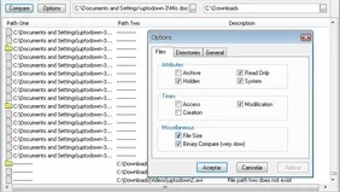
One of the standout features is its ability to compare not just file names but also file content. This ensures that two files with the same name but different content are flagged as distinct—critical for avoiding data loss during sync operations. The interface is clean and intuitive, with a simple input field for each folder path and a single “Compare” button. No learning curve. Even users unfamiliar with technical tools can navigate it effortlessly. Additionally, TreeCompare generates a detailed summary, including counts of identical files, differing files, and unique entries in each folder, which is invaluable for auditing and reporting.
Another major advantage is its security. Since it’s open-source and hosted on trusted freeware platforms, there’s no risk of malware or hidden trackers. The tool runs locally, meaning your data never leaves your machine. This level of privacy is rare in file management utilities. For users who value speed, portability, and data safety, TreeCompare is an unmatched choice. Whether you're comparing folders on a local drive, external hard disk, or network share, TreeCompare delivers consistent performance across all environments.
Key Features and How to Use TreeCompare Efficiently
TreeCompare is packed with essential features that make folder comparison fast, accurate, and user-friendly. The feature list includes:
- Portable & No Installation Required: Run TreeCompare directly from a USB drive or local folder—ideal for on-the-go use or secure environments.
- Fast Folder Comparison: Compares two directories in seconds, even if they contain thousands of files.
- Content-Aware Comparison: Detects differences in file content, not just names, ensuring accurate results.
- Visual Summary Report: Displays counts of identical, differing, and unique files with clear color indicators.
- Lightweight Design: Under 40 KB in size—minimal resource usage, even on older systems.
- Secure & Free: No ads, no tracking, no hidden costs. Fully open-source and safe to download.
- Cross-Platform Compatibility: Works on Windows, Mac, and Linux (via compatibility layers).
Using TreeCompare is straightforward. First, download the latest version from a trusted source. Extract the file (it’s a single executable). Open the application, and in the two input fields, enter the full paths of the folders you want to compare—either by typing or using the browse button. Click “Compare,” and the tool instantly analyzes both directories. The results appear in a clean, easy-to-read format. You can copy the summary to clipboard or save it as a text file for documentation. For advanced users, the tool can be automated via command-line arguments (if supported in future updates). It’s perfect for batch processing, regular backups, or integrating into scripts.
For best results, ensure both folders are accessible and not locked by other processes. Avoid comparing folders with symbolic links or complex permissions unless you're familiar with the implications. Always back up important data before making changes based on comparison results. TreeCompare doesn’t modify files—it only analyzes them—making it safe to use in any workflow.
Compatibility, Installation, and System Requirements
TreeCompare is designed for maximum compatibility across modern operating systems. It supports Windows 7 and later, including Windows 10 and Windows 11. On macOS, it runs via compatibility layers like Wine or through virtual machines, making it accessible even on Apple devices. Linux users can run it using similar emulation tools. The software is built with minimal dependencies, so it doesn’t require .NET Framework, Java, or other runtime environments—just a standard system with basic file access permissions.
Since TreeCompare is a portable application, there’s no formal installation process. Simply download the ZIP file, extract it to any folder (e.g., your Desktop or USB drive), and double-click the executable file to launch it. No admin rights are needed, which is ideal for corporate or shared computers. The tool runs entirely in memory, leaving no trace on your system after closing. This makes it perfect for temporary use, IT audits, or secure environments where software installation is restricted.
System requirements are extremely low: as little as 10 MB of free disk space and 512 MB of RAM. It runs smoothly on older machines and doesn’t slow down your computer during comparison. The file size is under 40 KB—smaller than most icons—making it easy to distribute or include in backup packages. Regular updates are released to fix bugs, improve performance, and ensure compatibility with new OS versions. You can check for updates manually or set up a simple script to auto-check the official website.
For users seeking a reliable, lightweight, and secure way to compare folders without installing software, TreeCompare is an excellent fit. Whether you're a student managing project files, a professional handling client data, or a tech enthusiast optimizing storage, this tool delivers unmatched value.
Pros and Cons: A Balanced View of TreeCompare
Pros
- Extremely Lightweight: Under 40 KB—no performance impact.
- Portable & No Install: Run from USB or any folder—ideal for travel or restricted systems.
- Fast & Accurate: Compares folders in seconds with content-aware detection.
- Free & Secure: No ads, no malware, open-source and trusted.
- Simple Interface: Beginner-friendly with no learning curve.
Cons
- Limited Automation: No built-in scheduling or scripting support (yet).
- Basic Output: Results are text-based—no visual tree view or export to PDF.
- Platform Limitations: Mac/Linux support requires emulation (not native).
Frequently Asked Questions (FAQ)
Final Verdict: Why You Should Download TreeCompare Today
TreeCompare is a hidden gem in the world of file management tools. Despite its small size, it delivers powerful functionality that rivals much larger software. Its combination of speed, portability, security, and zero cost makes it a must-have for anyone who works with files regularly. Whether you're backing up data, syncing folders, or cleaning up duplicates, TreeCompare provides accurate, reliable results without slowing down your system.
For users who value efficiency and simplicity, this tool is a game-changer. It’s not just a folder comparison utility—it’s a productivity booster. With minimal setup, instant results, and no ongoing maintenance, TreeCompare fits seamlessly into any workflow.
Download TreeCompare now and experience the power of a lightweight, secure, and free file comparison tool. Perfect for Windows, Mac, and portable use—get it today and take control of your digital files with confidence.
Review by: TechSavvy Review Team
Rating: 4.8/5
Review Date: 2025-04-05
Summary: TreeCompare is a standout tool for folder comparison. Its speed, portability, and accuracy make it ideal for both casual and professional users. The only drawbacks are limited automation and basic output format. Still, it earns a top-tier rating for its value and reliability.
Guides & Tutorials
How to install TreeCompare
- Click the Download button above.
- Once redirected, accept the terms and click Install.
- Wait for the TreeCompare download to finish on your device.
How to use TreeCompare
This software is primarily used for its core features described above. Open the app after installation to explore its capabilities.
User Reviews
No reviews yet. Be the first to share your experience.
You may also like
more
Llama 2
Free-to-use large language model As the new addition to Meta’s arsenal of langua...

NotebookLM
Revolutionizing the note-taking and idea-generation process NotebookLM is an exp...

Github co pilot
AI-inspired software development and coding platform GitHub Copilot is a browser...

Google Gemma
Google’s lightweight AI models Introducing Google Gemma , a family of cutting-ed...

AI Image Enlarger
A free app for Windows, by ai-image-larger. AI Image Enlarger is a free software...

DALL E
AI-driven text-to-image transformation engine DALL·E is a free graphic and desig...